
How to Automate Your Bakery Shopping List and Plan Your Bake Week
It is Wednesday evening. Sophie and James are getting married on Saturday, and their three-tier lemon and elderflower cake is sitting on your list next to a birthday cake for a seven-year-old and two dozen cupcakes for an office party. You open three recipes, a notebook and a half-written supermarket list, and you start adding up butter. Then you add it up again, because you are not sure you counted the cupcakes.
Every baker knows this moment. The baking is the joy. The maths, the lists and the second trip to the shop for the cake boards you forgot are what wear you down. This guide shows how to turn a busy week of orders into one accurate shopping list and a calm production plan, so you can give couples like Sophie and James the cake they dreamed of without the midweek panic.
Key Takeaways
- Attach the materials each order needs, and your weekly shopping list can build itself.
- One combined list stops double counting, forgotten supplies and extra shopping trips.
- A production schedule tells you what to bake, fill, decorate and deliver on each day.
- Pasting your shopping receipts keeps ingredient and supply prices up to date, so your quotes stay profitable.
- Planning on a laptop or tablet gives you the full picture of your week, while your phone handles the shop.
Why bakery shopping lists go wrong
Most shopping lists fail for the same three reasons. First, the quantities live in different recipes, so you have to scale and combine them by hand. Second, supplies such as cake boards, dowels, boxes and ribbon are rarely written into a recipe at all, so they are the first things forgotten. Third, orders change. A couple adds a fourth tier, or a birthday cake switches from vanilla to chocolate, and the list you wrote on Monday is already wrong by Thursday.
The fix is not a better notebook. It is linking your list directly to your orders, so the list changes when the orders change.
Step 1: Give every order a materials list
In Cake Aide Pro, each order can carry its own materials list. Open the order, choose the recipes and supplies it needs, and you are done. For Sophie and James that might be three tiers of lemon sponge, elderflower syrup, Swiss meringue buttercream, a 12 inch drum board, cake boards for each tier, dowels and a length of ivory ribbon.
Because your recipes are already built from your saved ingredients, the app knows exactly how much flour, sugar, butter and eggs each recipe uses. You never need to type those quantities again.
Step 2: Let the shopping list build itself
Once your orders for the week have their materials, Cake Aide Pro gathers everything into one consolidated shopping list. The butter from the wedding cake, the birthday cake and the cupcakes is combined into one line. Your cake boards, boxes and ribbon sit right alongside your ingredients, so nothing is left behind.
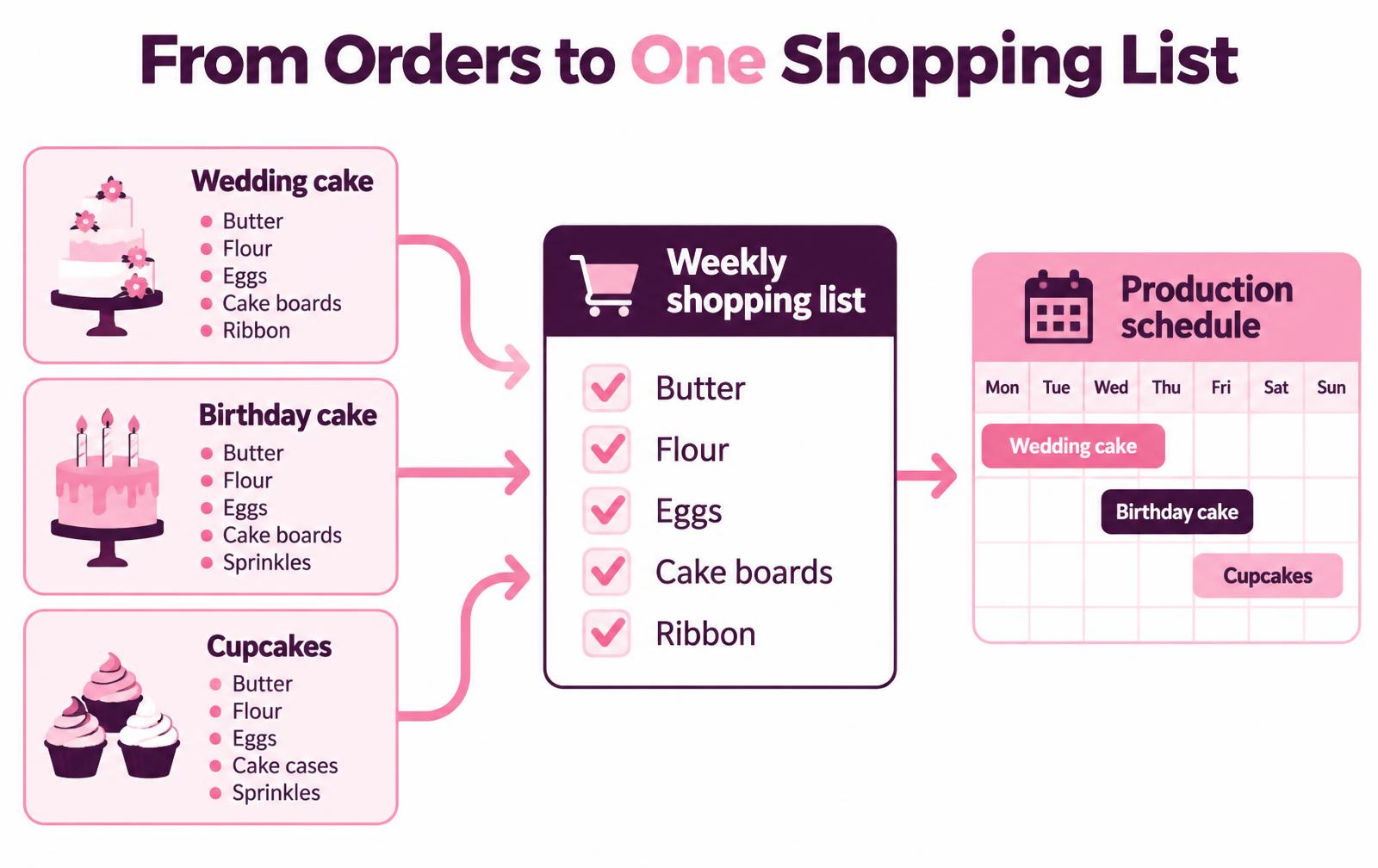
Take the list to the shop on your phone and tick items off as you go. One trip, one list, and no late night dash for the eggs you were sure you had.
Plan this week's orders in your browser
Open Cake Aide Pro on your laptop, tablet or phone and build your first automatic shopping list today. There is nothing to download.
Step 3: Turn your orders into a production schedule
A shopping list tells you what to buy. A production schedule tells you when to use it. Cake Aide Pro lets you plan your bake week around your delivery dates, so you can see at a glance that the wedding sponges bake on Wednesday, the tiers are filled and crumb coated on Thursday, and decoration and stacking happen on Friday, ready for Saturday morning.
You can add your own tasks too, such as "make sugar flowers" or "confirm venue delivery time", so the small jobs that keep a wedding running smoothly never slip through the cracks. As each stage is finished, you can send your customer a status update, which gives an anxious couple real peace of mind in the week before their big day.
Step 4: Keep your prices accurate with your receipts
A shopping list is only half the story. The other half is knowing what that shopping actually cost you. After your trip, simply paste your receipt into Cake Aide Pro. The app picks out your ingredients and your supplies, along with their prices, and updates your saved lists.
That matters because your quotes are built from those same ingredients, supplies and the time and rates you set in your settings. When butter goes up, your next quote knows about it. You stay profitable without spending your evenings in a spreadsheet. If you want to go deeper on pricing, read our cake calculator guide or try the free cake pricing calculator.
Everything stays connected
The shopping list is one part of a connected system. An inquiry from your branded inquiry form becomes an order. That order can become an invoice, and an invoice can become an order. Its materials feed your shopping list, and the order sits in your production schedule. When the cake is delivered, a quick tap on the order menu lets you set a birthday or anniversary reminder, so next year you can invite the same family or couple to order again.
For a full walk through of the order journey, see how to manage cake orders without the chaos.
Back to Sophie and James
With every order linked to its materials, Wednesday evening looks very different. One list is already waiting on your phone. Your schedule shows exactly what happens on each day. On Saturday morning you deliver the cake, the couple see it for the first time, and the only thing on your mind is their smile.
That is what good planning gives you: more time for the part of baking you love, and a better experience for every customer who trusts you with their celebration.
Ready for a calmer bake week?
Subscribe through the Cake Aide Pro web app and manage orders, shopping lists and schedules from any device.
Frequently asked questions
How does Cake Aide Pro create a shopping list automatically?
You add a materials list to each order by choosing the recipes and supplies it needs. Cake Aide Pro then combines the materials for all your orders into one shopping list.
Does the shopping list include supplies as well as ingredients?
Yes. Cake boards, boxes, dowels, ribbon and any other supplies you save can be added to an order, and they appear on the same list as your ingredients.
Can I update ingredient prices from my shopping receipts?
Yes. Paste your receipt into the app and it picks out your ingredients and supplies with their prices, keeping your costs and quotes accurate.
Can I use Cake Aide Pro on my computer?
Yes. Cake Aide Pro works in your web browser at app.cakeaidepro.com, and you can subscribe there directly. It is also available on the App Store and Google Play.
Frequently Asked Questions
You add a materials list to each order by choosing the recipes and supplies it needs. Cake Aide Pro then combines the materials for all your orders into one shopping list.
Yes. Cake boards, boxes, dowels, ribbon and any other supplies you save can be added to an order, and they appear on the same list as your ingredients.
Yes. Paste your receipt into the app and it picks out your ingredients and supplies with their prices, keeping your costs and quotes accurate.
Yes. Cake Aide Pro works in your web browser at app.cakeaidepro.com, and you can subscribe there directly. It is also available on the App Store and Google Play.